
Your brain is for having ideas. Murmur is for keeping them.
Murmur is the memory you do not have to try to keep.
Murmur · Second Memory Guide
What is Murmur
A simple home for the things you do not want to forget.
Murmur catches quick thoughts and turns them into clear notes you can act on.
You can keep everything in one place, then send it to the tools you already use.
Google Calendar
Connect calendars.

Notion
Connect your integration key.
Obsidian
Set up local Wi-Fi sync with API key and vault-friendly defaults..
Creator tips · How I use Murmur
Three habits that make capture stick.
Real workflows from daily use — steal them.
Tip 1 · Brain-dump with voice
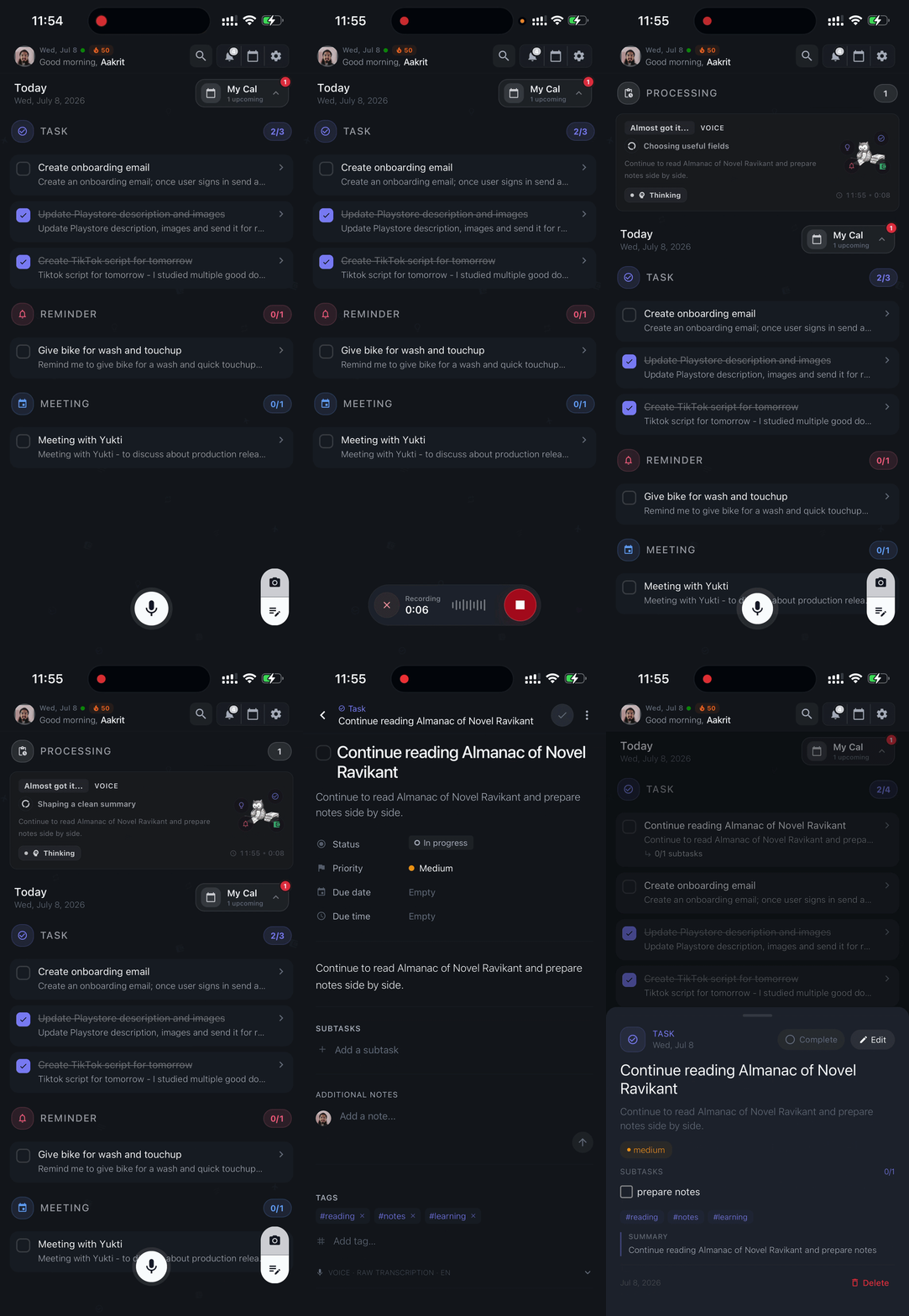
I brain-dump with voice while I am in motion
Fast capture before the idea disappears
Most of my good ideas show up between meetings, while walking, or right before I switch context.
I tap the mic, speak naturally for a few seconds, and let Murmur structure it into something I can use later.
Creator tip: Do not edit while talking. Capture first, refine later.
Tip 2 · Type in silence
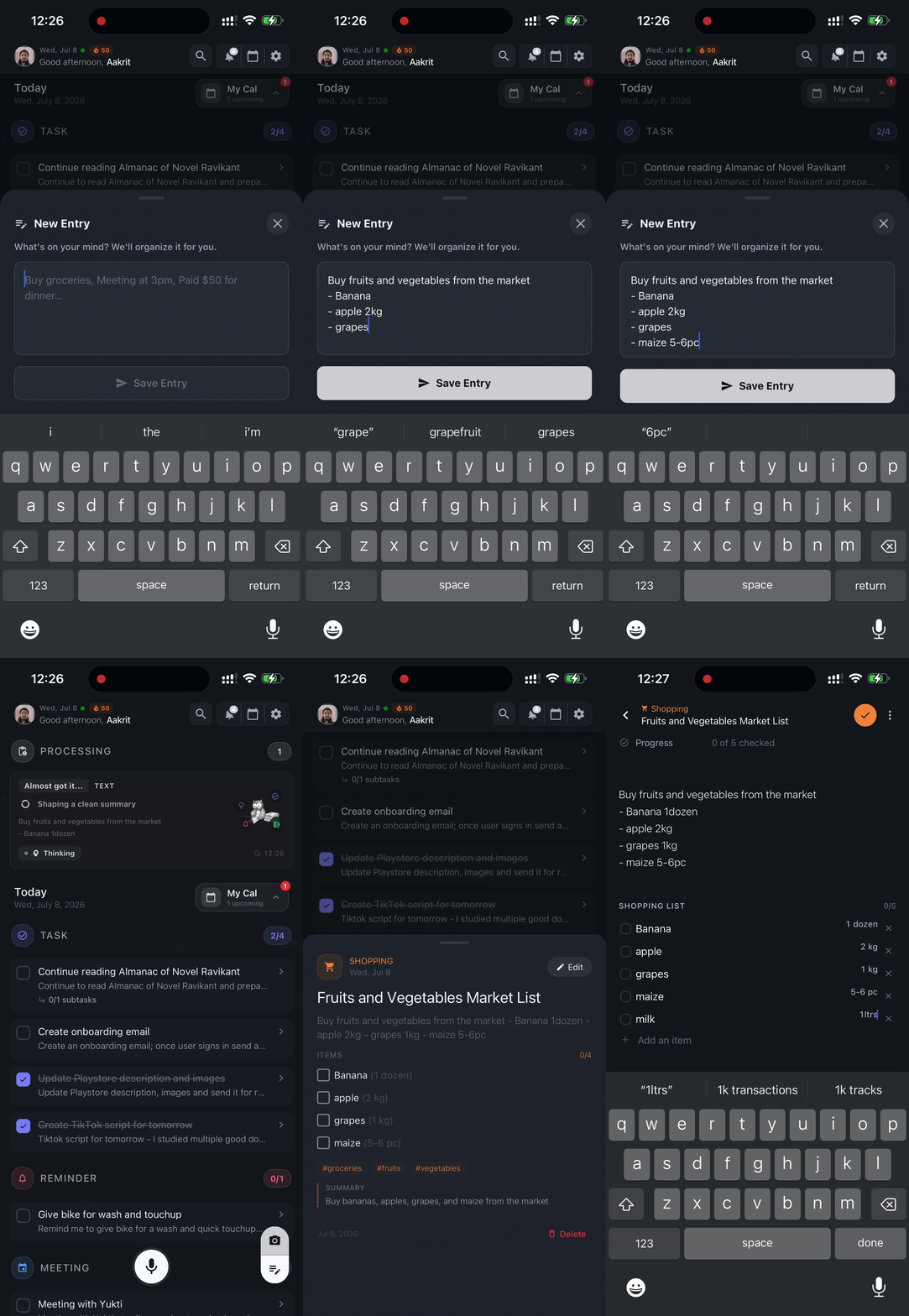
I switch to typing when the room needs silence
Same speed, different input
When I am in a shared space or on a call, voice is not always practical.
I type the thought in the same flow and keep moving without breaking focus.
Creator tip: Text mode is one tap away, so the workflow stays identical.
Tip 3 · Paper to digital
I turn receipts and scribbles into searchable notes
Capture from the physical world
Sticky notes, receipts, and quick sketches are useful until they disappear.
I snap a photo and Murmur converts it into a clean digital entry I can find later.
Creator tip: Best results come from clear photos and readable handwriting.
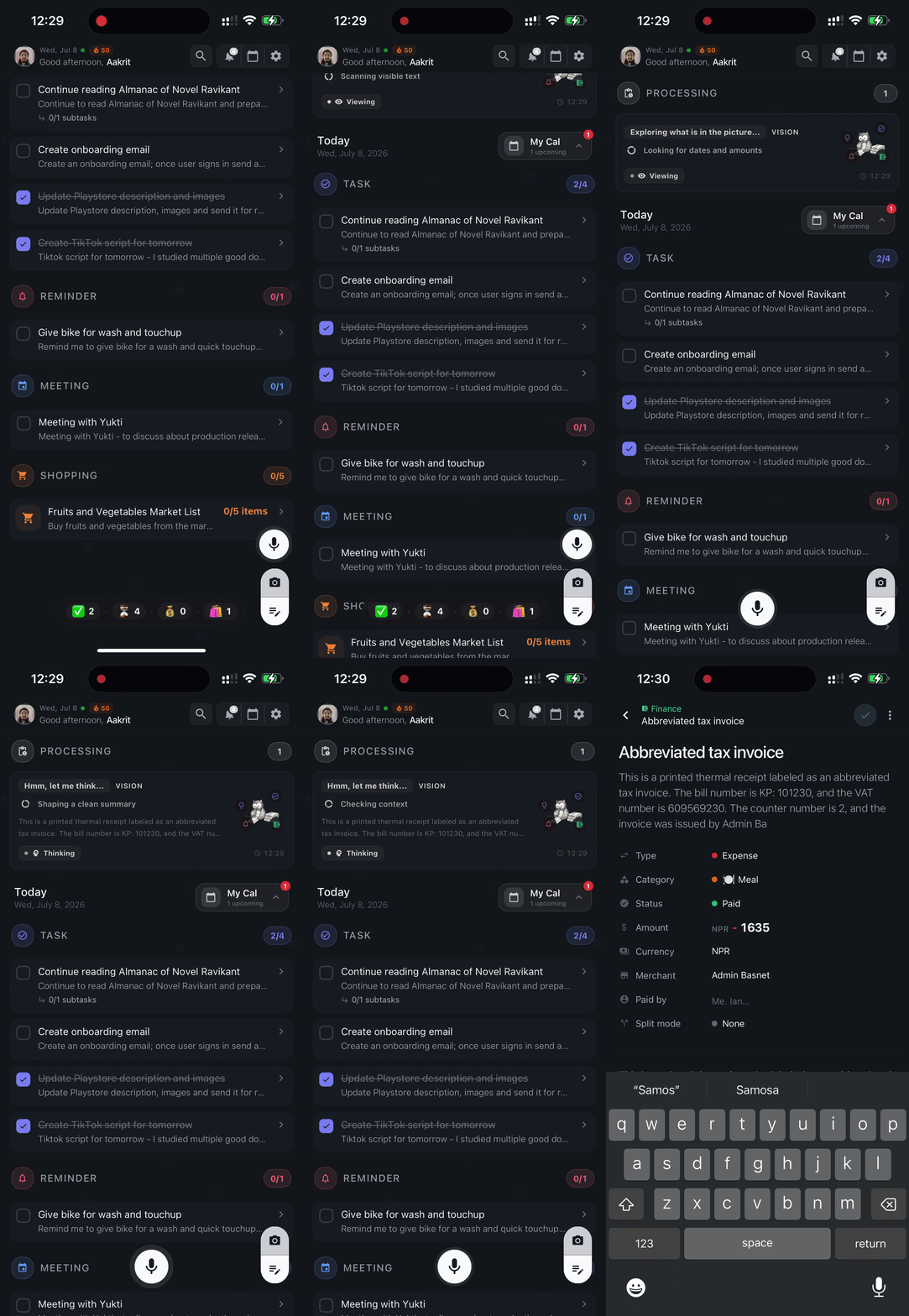
Quick start
Up and running in three steps.
- 1
Open and capture
Your first thought, instantly
Open Murmur, tap the mic, and say what is on your mind. You can also trigger it with Siri and let Murmur handle the rest.
No setup friction. Open the app and go.
- 2
Review and add
Shape it in seconds
Add subtasks, fill in missing details, and attach extra notes only when needed. Keep it lightweight, then share when you are ready.
Structure first, polish only if it helps.
- 3
Connect
Sync into your existing flow
Connect your favorite tools and your notes show up where you need them. Connecting multiple calendars helps you see your full day and plan with less context switching.
That is it. Capture once, use everywhere.
Integrations
Detailed setup guides.
Expand a section for the full setup — prerequisites, steps, and fixes.
Google & Apple CalendarSee your events next to tasks and reminders.
Calendar sync · Google + Apple
Connect Google Calendar and Apple Calendar to see your events right inside Murmur — alongside your saved entries. Same flow for both providers.
Setup steps
- 1Open Murmur → Settings → Calendar Integrations
- 2Tap Add Google Calendar or Add Apple Calendar
- 3Sign in and allow calendar permissions
- 4Select the calendars you want to see in Murmur
After connecting: Your selected events appear in your dashboard. You can link or unlink calendars anytime in Settings.
Calendar missing? Check app calendar permissions, confirm at least one calendar is selected, then pull to refresh.
NotionSend entries to a Notion database automatically.
One-way sync · Murmur → Notion
Murmur sends entries to a Notion database automatically. Build dashboards, filter by category, or link entries to projects — all inside Notion.
Before you start
- A Notion account
- A Notion integration key (from notion.so/my-integrations)
- A page shared with that integration
Connect Notion
- 1Open Murmur → Settings → Notion Integration
- 2Paste your Notion integration key
- 3Tap Connect and pick a page if asked
- 4Turn on "Enable Notion Sync"
- 5Tap "Sync Now"
What gets synced: A Notion database with title, category, date, tags, summary, and more.
Sync speed: Realtime ON → syncs after each save. OFF → batches every 12 hours.
Not syncing? Key may be wrong or expired · Page not shared with integration → Disconnect and reconnect in Settings.
ObsidianSave entries as Markdown in your local vault.
One-way sync · Murmur → Obsidian
Obsidian sync uses your local Wi-Fi — no cloud required. Entries go straight to your vault as Markdown files.
Before you start
- Obsidian installed on your laptop
- "Local REST API" plugin installed and enabled
- HTTP server ON, local network allowed, port 27123
- Copy the API key from plugin settings
- Laptop and phone on the same Wi-Fi
- Obsidian open on your laptop
Connect Obsidian
- 1Open Murmur → Settings → Obsidian Integration
- 2Tap "Find" to auto-detect your laptop — or enter the Base URL manually (http://<laptop-ip>:27123)
- 3Paste your API key
- 4Tap "Connect to Obsidian"
- 5Turn on "Enable Obsidian Sync" and tap "Sync Now"
IP address changed? Tap "Find" again or update the Base URL manually.
What gets created: Notes in a Murmur folder, named by title, with category sections.
FAQ
Common questions.
Quick answers to get you moving.
Do I need technical knowledge to use Murmur?
No. Basic setup is simple and guided inside Settings. The integration guides on this page walk you through every step.
Can I use both Notion and Obsidian at the same time?
Yes. You can enable both integrations independently from Settings.
Does sync work both ways?
No. Sync is one-way — entries go from Murmur to Notion or Obsidian. Changes made in Notion or Obsidian do not come back into Murmur.
Do I need the Obsidian mobile app?
No. Obsidian on your laptop is enough. The sync goes from Murmur on your phone to Obsidian on your laptop over Wi-Fi.
Why is Obsidian sync not working?
The most common reasons: Obsidian is closed on your laptop · Your phone and laptop are on different Wi-Fi networks · Your laptop's IP address changed (tap Find to re-detect it) · Wrong key or wrong Base URL/port.
Why is Notion sync not working?
The most common reasons: Wrong or expired integration key · The Notion page is not shared with your integration · Sync is turned off in Settings.
Is my integration key stored safely?
Keys are saved on your device only and used to connect your account. They are not sent anywhere else.
Can I disconnect anytime?
Yes. You can disconnect either integration from Settings at any time. Your Murmur entries will not be deleted.
Troubleshooting
Before you contact support.
Run through this checklist first. It solves most problems.
General
Update the app, check your internet, make sure sync is on, then tap "Sync Now."
Obsidian only
Keep your laptop awake, keep Obsidian open, and make sure both devices share Wi-Fi.
Notion only
Make sure your key is valid and the right Notion page is shared.
Still not working? Disconnect and reconnect the integration from Settings.
Support
Still need help?
If you have gone through the checklist and things still are not working, reach out.
Email
support@murmurapplication.com
Feedback
murmur.canny.io

Capture with Murmur. Build with your second brain.
Speak, type, or scan once. Keep the thought moving everywhere it needs to go.
Get Murmur